I think my PC has a Virus
I think my PC has a Virus
3 April 2017
Can’t find what you are looking for in this post? Please visit forum and let’s chat!
Hey All
Here is a couple of steps to take to help yourself get rid of a Virus and other Malware
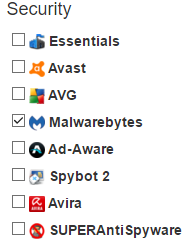
I would advise you to get anti-virus software. If you don’t have, download from Ninite.com There is a whole range of free anti-virus programs under The Security section.
NB. Please set time aside to do this. It will interrupt your work so, save all open windows and close them. And work on a second laptop or read a Book or the Bible while you patiently progress through the steps
- Step 1 is to download anti-virus software or update your existing software. (Download also Malwarebytes as a secondary anti-virus to scan with)
- Step 2 Run a quick scan after it is updated.(Also run Malwarebytes, threat scan.)
- Step 3 Run a full system scan.(This will take sometime) If during any of these scans it finds any threats, just wait till the end and clean it or resolve it.
- Step 4 Update your Web browser as this is were most malware comes through where you are browsing. If you need help to update your web Browser follow this link : http://www.computerhope.com/issues/ch001388.htm
- Step 5 Hopefully you have cleared some threats through the scans. Download this next program here: https://www.malwarebytes.com/adwcleaner/ And run it and clean after it is done.
If you still have problems feel free to contact us at itsupport@shofaronline.org
Kind regards
IT team